

Updating a business address in California means filing with four agencies: the Secretary of State (Statement of Information via bizfileOnline), the Franchise Tax Board (MyFTB or Form FTB 3533-B), the IRS (Form 8822-B), and the CDTFA if you hold a seller's permit. File online wherever possible and save every confirmation number. Don't skip your registered agent's records or a USPS mail-forwarding request.
TL;DR:
- Updating your California business address requires separate filings with the Secretary of State, Franchise Tax Board, IRS, and possibly CDTFA, each with different forms and processing times.
- Filing online through bizfileOnline is the fastest method for Secretary of State updates, costing between $20 and $25, and most filings are confirmed immediately.
- The FTB offers online updates via MyFTB, or Form 3533-B by mail, with mail filings taking several weeks; ensuring the correct FEIN and entity number is critical.
- IRS Form 8822-B must be submitted separately within 60 days if your responsible party or physical address changes to avoid misdirected notices and missed deadlines.
- If you hold a seller’s permit, you must also update CDTFA using Form CDTFA-345-WEB to prevent tax obligations from being wrongly assigned to theold location.
Table of Contents
- Which agencies need to know about your business address change California businesses often overlook
- How do you update your address with the California Secretary of State?
- How do you change your address with the Franchise Tax Board?
- When do you need to file IRS Form 8822-B?
- Do you need to update CDTFA for your sales tax account?
- What changes with your registered agent and internal documents?
- What's the full checklist for a California business address change?
- What does it cost, and how long does each filing take?
- How do you confirm your address update actually went through?
- Who's behind this guide, and how Legal Stepz supports California filings
- Should you file this yourself or bring in help?
- Get your California filings handled without chasing four different portals
- Where to find the official forms and portals
- Sources
Which agencies need to know about your business address change California businesses often overlook
Most owners think of an address change as one form. It's actually a checklist spread across at least four government levels, plus your own paperwork.
Here's who needs to hear from you and why:
- California Secretary of State — the entity of record for LLCs, corporations, and limited partnerships. This is your public-facing address, visible to anyone who searches your business name.
- Franchise Tax Board — handles correspondence tied to whichever return your entity files (Form 100, 100S, 100W, 109, 199, 541, 565, or 568).
- IRS — tracks your federal mailing address and, separately, your "responsible party" on file with your EIN.
- CDTFA — relevant only if you hold a seller's permit or use-tax account; a location change here has its own rules.
- USPS, city/county licensing offices, your bank, vendors, and payroll processor — none of these update automatically just because the state records changed.
- Your registered agent and internal governance documents — often the most neglected piece, and the one with real legal teeth if it's wrong.
Miss one of these and you end up with mismatched records: the SOS thinks you're at address A while the FTB still has address B. That mismatch is exactly what triggers delayed notices, bounced mail, and occasionally a missed legal filing deadline.
How do you update your address with the California Secretary of State?
This is usually the first stop, since your Statement of Information is the public record most banks, courts, and vendors check first. California doesn't let you email a change or call it in. You file the correct form through bizfileOnline, the Secretary of State's official portal.
Here's the process:
- Log into bizfileOnline and search for your entity by name or file number to pull up your current record.
- Select the correct form for your entity type. Corporations file Form SI-200 (or SI-200C for a short-form update), LLCs file Form LLC-12, and limited partnerships have their own amendment form.
- Update the address fields carefully. California distinguishes between your principal executive office and your mailing address, and the form wants both filled out correctly, not left blank or duplicated by guesswork.
- Confirm who's authorized to sign. An officer, member, or manager listed on the entity's record typically needs to sign, depending on entity type.
- Submit and save your confirmation. BizFile Online processes these filings immediately and generates a confirmation you should save as proof the moment you submit it.
On fees: a periodic Statement of Information for a corporation runs $25, and for an LLC it's $20. Here's what most owners don't realize: if you're updating your address off-cycle, before your next periodic filing is due, that amended filing is often free. Filing in person adds an extra fee, so stick with the online portal unless you have a specific reason not to.
Pro Tip: Don't wait for your biennial or annual Statement of Information deadline to fix your address. Filing an amended statement the same week you move costs nothing extra in most cases and closes the gap before anyone searches your outdated record.
If you need official proof of the update for a bank or a court filing, request a certified copy from the Secretary of State rather than relying on a screenshot of your bizfileOnline confirmation.
How do you change your address with the Franchise Tax Board?
The FTB gives you two paths, and picking the right one saves you a mailing step entirely. FTB's own guidance confirms that updating online or by phone means you don't need to mail anything in.
Option one: MyFTB portal. Log in, go to your Profile, select "Update contact information," and edit your address directly. This is the fastest route and updates your record immediately.
Option two: Form FTB 3533-B. This form is specifically for businesses, exempt organizations, estates, and trusts changing a mailing or location address, and it's required for entities filing Forms 100, 100S, 100W, 109, 199, 541, 565, or 568. If you're not set up with MyFTB access yet, or you'd rather submit something in writing, this is your form.
If you mail it, send Form 3533-B to:
- Franchise Tax Board, PO Box 942840, Sacramento, CA 94240-0002
A few details matter more than people expect. You'll need your corporation number or SOS file number and your FEIN on hand before you start. If a representative is filing on your behalf, the instructions spell out how to document that authorization. PO boxes and foreign addresses have their own handling notes in the form instructions, so don't assume a standard street-address format applies.
One practical reason to get this right quickly: if the FTB owes your business a refund, an outdated address is the single fastest way to have that check mailed somewhere you no longer receive mail.
When do you need to file IRS Form 8822-B?
Federal and state records don't talk to each other. Updating your California filings does nothing for your IRS record, which is why Form 8822-B exists as its own separate step.
File it when any of the following happens:
- Your business mailing address changes.
- Your business location changes (even if the mailing address stays the same).
- Your "responsible party," the individual the IRS considers accountable for the entity, changes.
That last one carries a hard deadline: responsible-party changes must be reported to the IRS within 60 days. Address changes alone don't carry that same strict window, but delaying still means IRS notices, audit letters, and tax documents go to the wrong place.
Download Form 8822-B directly from IRS.gov and mail it to the address listed for your state in the instructions. There's no online filing option for this one, so budget a little extra time for mail processing. Skipping this step doesn't just create an inconvenience. It can mean missing a notice about an issue with your EIN or a filing deadline you didn't know existed.
Do you need to update CDTFA for your sales tax account?
If your business holds a seller's permit or use-tax account, moving locations triggers a separate CDTFA obligation that has nothing to do with your SOS or FTB filings.
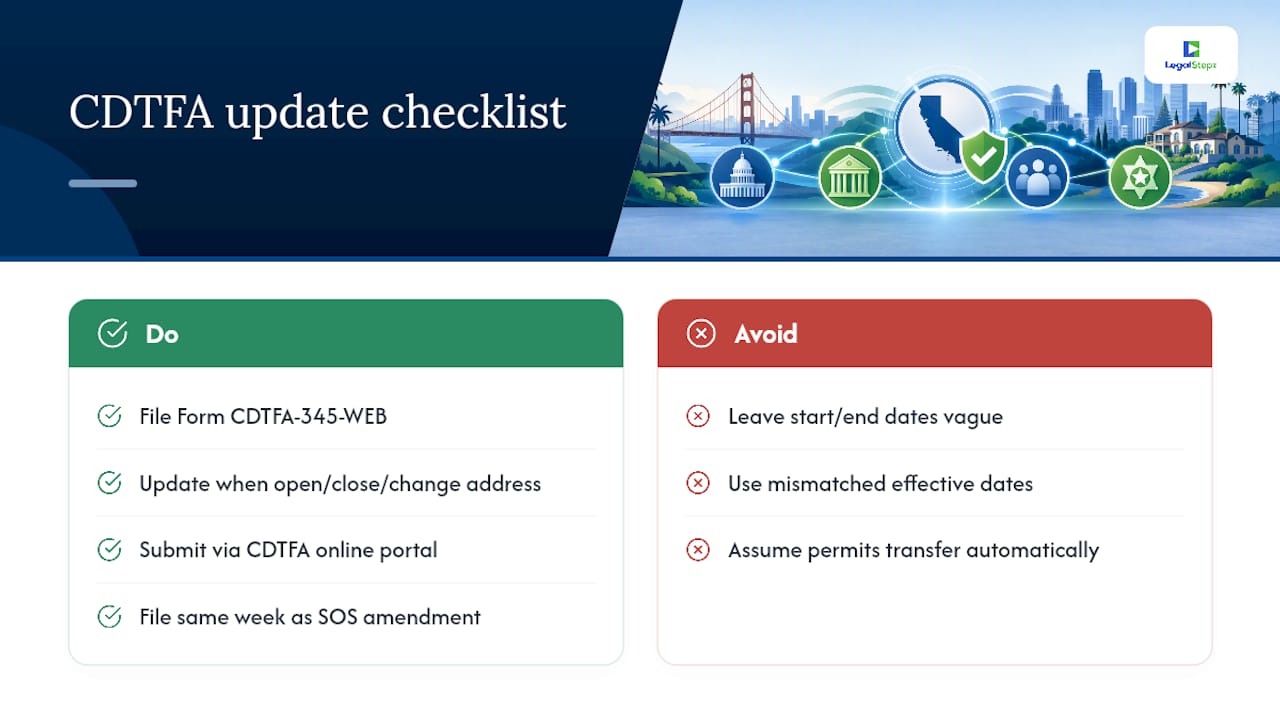
CDTFA needs an update when you open a new physical business location, close one, or change your mailing address for tax correspondence. The relevant tool is Form CDTFA-345-WEB, the Notice of Business Change, which you can also submit through CDTFA's online services portal.
A detail that trips people up: the form asks for a start date for the new address and an end date for the old one. Leave these vague or mismatched, and CDTFA's system can end up applying tax obligations to the wrong location for a stretch of time.
Beyond CDTFA, check whether your city or county requires a separate business license update, and confirm any special permits tied to your old location, health permits, alcohol licenses, signage permits transfer with the move or need reissuing. The practical move is to file your CDTFA update the same week as your Secretary of State amendment so the two records reflect the same effective date instead of drifting apart by weeks.
What changes with your registered agent and internal documents?
Three addresses get confused constantly: your principal office (where business happens), your mailing address (where correspondence goes), and your registered agent's address (where legal papers get served). They can be the same address or three different ones, and California's Statement of Information asks about all of them separately.
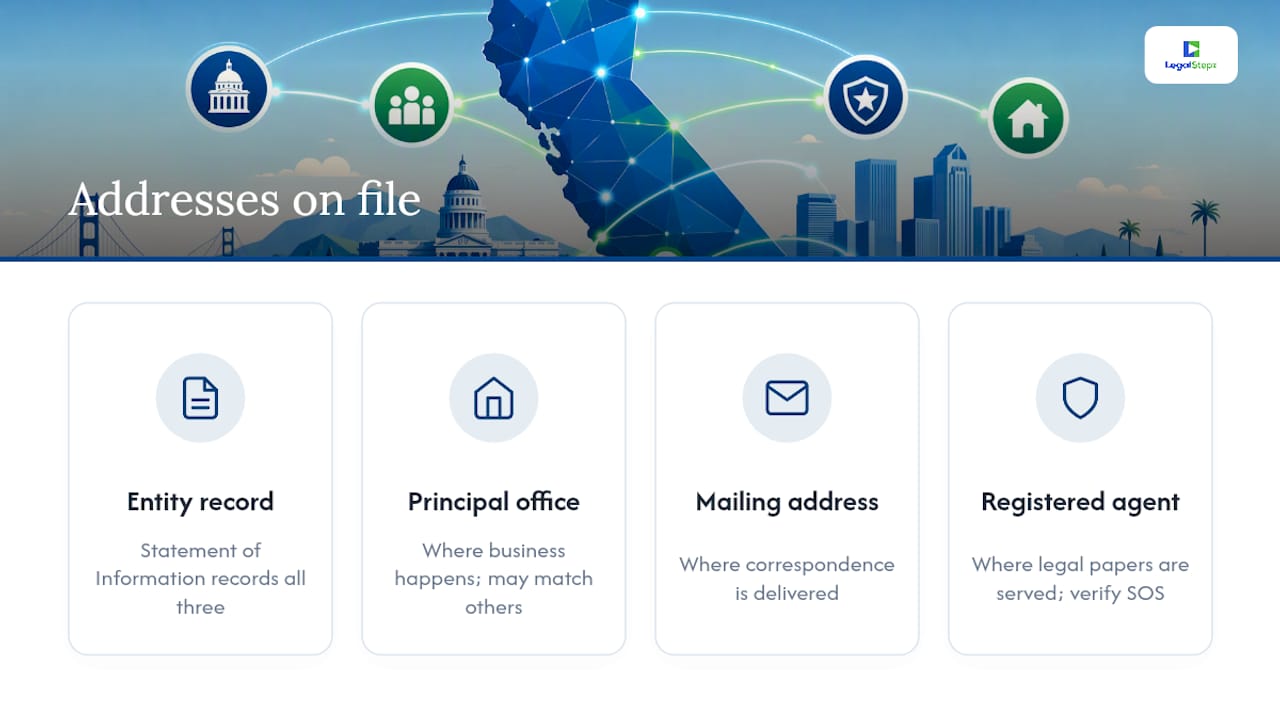
Your agent for service of process is usually updated through the same Statement of Information filing that updates everything else, but if you need help with official filings and notarization consider Expert Legal Document Preparation & Notary Services. If you use a commercial registered agent service, that company is generally responsible for keeping its own address current with the Secretary of State, but it's worth verifying that update actually appears in your public record rather than assuming it happened.
Don't stop at the public filing, either. If your bylaws or operating agreement names a specific address for your registered agent or principal office, update that internal document too. An outdated agent address isn't just an administrative loose end. It's the mechanism behind missed legal notices and default judgments, because courts serve papers to whatever address is on file, whether or not anyone still checks that mailbox.
Pro Tip: After any address change, search your own entity on bizfileOnline a week later. If your registered agent's address still shows the old one, follow up with your agent service immediately rather than assuming it will correct itself.
What's the full checklist for a California business address change?
Work through these roughly in order. Doing the state and federal filings before the secondary notifications keeps your public records consistent while you handle everything else.
- File your USPS change-of-address for the business, either online through the postal service or in person with the appropriate form.
- File an amended Statement of Information with the Secretary of State through bizfileOnline.
- Update your address with the FTB via MyFTB or Form 3533-B.
- Submit IRS Form 8822-B if your mailing address, location, or responsible party changed.
- Update CDTFA if you hold a seller's permit or use-tax account.
Once those five are done, work through the secondary list.
- Notify your bank, payroll provider, and key vendors directly.
- Update any city or county business license tied to your old location.
- Update your registered agent's records if they haven't updated automatically.
- Revise internal documents (bylaws, operating agreement) that reference a specific address.
Save everything as you go: confirmation screenshots, filing numbers, and tracked mail receipts for anything you mail. If your Statement of Information is due for its regular periodic filing soon anyway, consider timing your address update to land right before that window so you're not filing twice in close succession.
What does it cost, and how long does each filing take?
Online filings move fast. Mail filings don't. Here's what to expect agency by agency.
| Filing | Typical processing time | Fee |
|---|---|---|
| SOS Statement of Information (online) | Immediate confirmation | $25 corporations, $20 LLCs (often free for interim/amended updates) |
| SOS Statement of Information (in person) | Same day | Standard fee plus additional in-person charge |
| LP amendment | Varies by filing method | $25 or $20 |
| FTB address update (MyFTB) | Immediate | No fee |
| FTB Form 3533-B (mail) | Several weeks | No fee |
| IRS Form 8822-B (mail only) | Several weeks | No fee |
| CDTFA Notice of Business Change | Days to a few weeks | No fee |
If a few weeks pass and your record still shows the old address, don't assume it's fine. Call the relevant agency's support line and reference your confirmation number or tracked mail receipt.
How do you confirm your address update actually went through?
Filing the form isn't the finish line. Confirming it landed correctly is what actually protects you.
For the Secretary of State, search your entity on bizfileOnline a few days after filing to see the updated record live. For the FTB, log back into MyFTB and check your profile. If you need something more official than a screenshot, most banks and courts will accept a certified copy requested directly from the Secretary of State.
The most common mistakes worth watching for:
- Filing the SOS update but forgetting Form 8822-B, leaving the IRS with a stale address.
- Updating FTB and IRS but never touching CDTFA, despite holding an active seller's permit.
- Assuming a registered agent service automatically reflects the new address in public records without checking.
- Not saving confirmation numbers, then having no proof of filing when a dispute comes up months later.
- Using an old form version instead of the current year's FTB or CDTFA form.
If two weeks pass with no confirmation notice from an agency you filed with by mail, that's your cue to call rather than wait it out.
Who's behind this guide, and how Legal Stepz supports California filings
This guide is written by Peter, a contributor at Legal Stepz covering business compliance and registered agent procedures for California entities. Legal Stepz files Statements of Information, provides registered agent services, and builds compliance packages specifically for California LLCs and corporations.
The team handles the parts owners tend to skip: saving confirmations, requesting certified copies when a bank or court needs one, and coordinating SOS, FTB, and CDTFA updates so your records land on the same effective date instead of drifting apart over separate mailings.
Should you file this yourself or bring in help?
Filing your own address change makes sense when you're a single-entity business, nothing's in litigation, and you're comfortable navigating bizfileOnline and MyFTB without hand-holding. Most straightforward moves fall into that category.
Where it gets riskier is multi-entity structures, businesses juggling several California filings at once, or anyone who's had a registered agent issue before. Professional filing doesn't just save time. It closes the gap where a missed notice turns into a default judgment, and it gives you a documented paper trail if a bank or court ever questions whether your address was updated correctly. If you're running more than one entity or you've been burned by a missed notice before, that's the scenario where full-service filing earns its cost.
— Peter
Get your California filings handled without chasing four different portals
Legal Stepz is the practical alternative to piecing this together yourself across bizfileOnline, MyFTB, and CDTFA on your own time. Instead of tracking four separate confirmations and hoping they all match, Legal Stepz files your amended Statement of Information, manages your registered agent record, and builds a compliance package so your address stays consistent across every agency that touches your business.
That matters most for owners managing more than one entity or anyone who's already dealt with a missed legal notice tied to an outdated address. The team handles the paperwork, saves your confirmations, and can pull a certified copy if a bank or court asks for proof later. If you're ready to update your business address correctly the first time, start a filing or request a consultation through the Legal Stepz site.
Where to find the official forms and portals
Bookmark these before you start, since you'll likely need more than one:
- bizfileOnline — file and search Statements of Information with the Secretary of State.
- FTB change-of-address help and Form 3533-B instructions — MyFTB steps and the mailable paper form.
- CDTFA Notice of Business Change — update seller's permit and use-tax account addresses.
- IRS Form 8822-B — federal address and responsible-party updates.
- USPS business change-of-address — mail forwarding for your old location.
This article is general information, not a substitute for advice from a qualified lawyer. Consult a qualified legal professional about your own circumstances before acting on anything here.
Sources
- Ftb
- 2025 Instructions for Form FTB 3533-B Change of Address for Businesses, Exempt Organizations, Estates and Trusts
- CDTFA‑345‑WEB Notice of Business Change
- IRS Form 8822-B